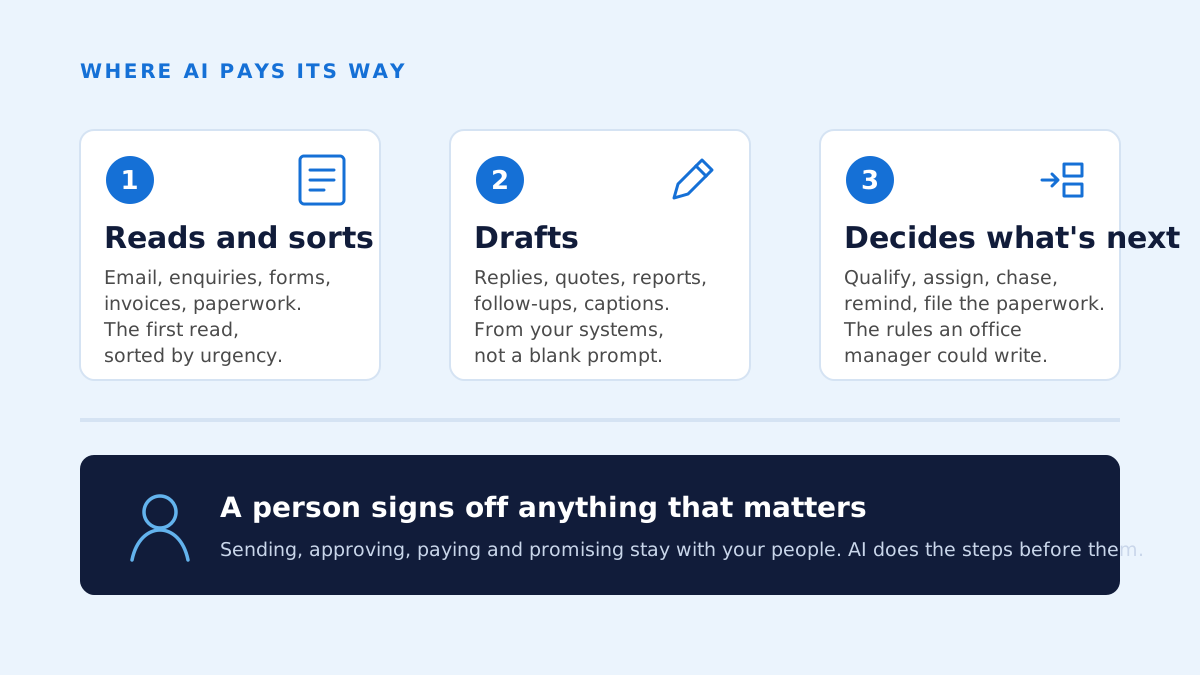
AI pays its way in three places in an established business: reading and sorting what comes in, drafting what goes out, and deciding what happens next. It pays when it lives inside the systems your people already use and a person stays in charge of anything that matters. Everywhere else, it's one more subscription.
Most first conversations this year get to the same question, one way or another. Where would AI actually help us? Not in general. Here, in this business, with these people and the systems we've already got.
It's the right question. The honest answer is narrower than the marketing suggests. After a year of building AI into systems businesses already run, I've found it pays its way in three places and wastes money in most of the others. Here's where I've seen it work, where I've seen it fail, and the four questions I ask before I build anything.
Why most AI tools don't earn their keep
Most businesses I talk to have already tried an AI tool. Someone signed up, it helped for a week, then it sat in a browser tab nobody opened. The tool usually wasn't the problem. The problem was that it wasn't connected to anything.
Work in a business happens inside systems: the inbox, the CRM, the job management software, the accounts package, the spreadsheet everything secretly hangs off. An AI tool that lives outside those systems asks a person to copy things into it and copy the answer back out. That's a new job, not a smaller one. Once the novelty wears off, nobody does it.
Bought on its own, AI is one more subscription. It starts paying its way when it's wired into the place the work already happens, and when it takes a step off someone's plate instead of adding one.
Where it pays: reading and sorting what comes in
The first place is the front door. Every business has a stream of things arriving that someone has to read before anything can happen: emails, enquiries, forms, documents, invoices, supplier paperwork. Somebody opens each one, works out what it is and how urgent it is, and decides who deals with it. That's reading. Reading is the thing today's AI does best.
The clearest example from my own work is an operations hub I built for a property development company. Their sales and marketing ran on a platform called GoHighLevel, and the team worked out of a shared inbox. The hub replaced that platform. Now AI sorts every incoming email by urgency and drafts replies to the urgent ones. A person edits and sends every reply. They still own the inbox. They just don't start the day reading all of it to find the three messages that matter.
The same pattern fits an intake form in a law practice, a supplier invoice in a manufacturer, or a site photo and a note from a builder's foreman. If a person has to read it before the business can act, AI can do the first read.
Where it pays: drafting what goes out
The second place is the other end of the process. Replies, quotes, reports, follow-ups, the Monday summary, the caption on a post. Most of what a business sends out follows a pattern, and most of the time someone still types it from scratch.
AI drafts well, provided two things are true. It needs the context, so it has to read from your systems, not from a blank prompt. And a person has to sign off before anything goes anywhere. In the content system I built for the same client, AI studies which posts performed, explains why, and drafts scripts and captions in each account's voice. Nothing goes out without a person's sign-off. That isn't caution for its own sake. It's what makes the drafts usable: the person fixes the ones that miss, and the system learns from it.
A draft you edit is a different thing from a draft you have to check. The first takes minutes. The second takes as long as it always did, plus the nagging sense that something's wrong.
Where it pays: deciding what happens next
The third place is the plumbing between the other two. A lead comes in: is it qualified, who should it go to, when should someone chase it if nothing happens? A quote goes out: when do we follow up? A job finishes: what paperwork is due now? These are decisions, but small ones, and most of them follow rules a good office manager could write down in an afternoon.
Automation has handled fixed rules for years. What AI adds is the step that used to need a person to read something first. In the hub, automations run from the website forms: qualify the lead, assign it, chase them to book a call, send the reminders. The person spends their attention on the call, not on remembering to send the reminder.
If you want to see what this looks like end to end, the process automation page walks through how I map a process before I touch it.
Where it doesn't pay
Three places, and I've learnt to be blunt about them.
- Judgement calls. Pricing a difficult job, deciding whether to take on a client, handling a complaint from someone who matters. AI can brief the person making the call. It shouldn't make it.
- Relationships. The reason your best customer stays is a person. Automate that conversation and you'll find out.
- Anything where a wrong answer costs more than the time it would have taken a person. A mis-sorted email costs a few minutes. A wrong figure on a compliance document can cost a great deal more. The question is never whether AI can do it. It's what happens on the day it gets it wrong.
There's a quieter fourth: low volume. If a task takes someone twenty minutes a month, no amount of AI will pay back the time it takes to build. Pick the thing that eats hours every week.
The four questions I ask before building anything
By the time someone's on a strategy call with me, they usually have a process in mind. These are the questions I put to it. Same four for a sole operator as for a company of 200.
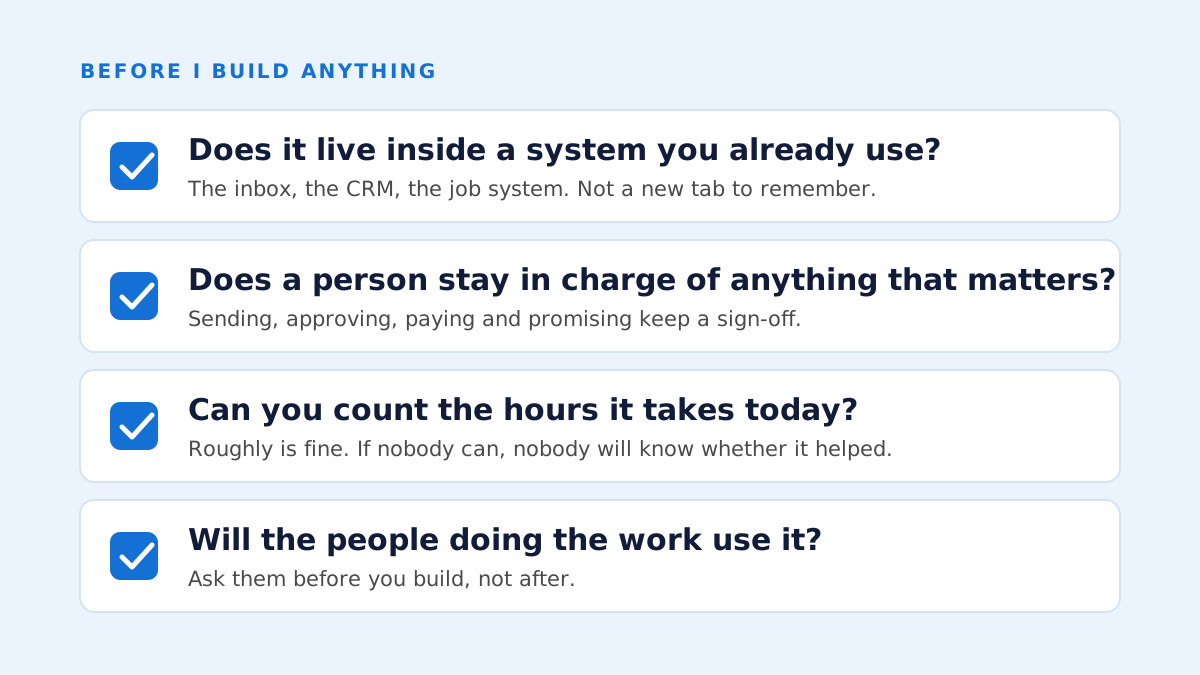
- Does it live inside a system you already use? If the answer involves a new app your people have to remember to open, my honest prediction is they won't. The fix has to arrive in the inbox, the CRM or the job system they're already in.
- Does a person stay in charge of anything that matters? Sorting, drafting and routing can run on their own. Sending, approving, paying and promising need a person's sign-off, and the system has to make that sign-off quick, so it doesn't get skipped.
- Can you count the hours it takes today? Not precisely. Roughly. If nobody can say how long the task takes now, nobody will be able to say whether the change helped, and that's how a project turns into a subscription.
- Will the people doing the work use it? The best predictor is whether they were asked. The person who does the job every day knows where it actually hurts, and they'll tell you in ten minutes if you ask before you build rather than after.
If the answer to any of the four is no, I say so on the call. Sometimes the answer is a simpler change with no AI in it at all. Sometimes it's a system that needs replacing before anything can be built on it, which is a different conversation. Either way, you leave knowing. That's worth more than a project that starts for the wrong reasons.
What it looks like to start
Bring one process. Not a strategy, not a transformation. One process that's eating your team's time, or one system you're sick of working around. Thirty minutes is enough to run it through the four questions and tell you whether AI can fix it, roughly what it'd take, and the first step worth taking. You get a short written summary afterwards, whether or not you ever work with me.
If it's worth doing, the next step is a written roadmap before any work starts: what I'd build, what it connects to and what it'll cost. Then the build, and you see it working early, not at the end. Then the handover, with your people trained and the documentation in their hands. That's the whole method, and it's on the AI implementation page in more detail.
The businesses that get the most from AI aren't the ones that bought the most of it. They're the ones that put it in the right three places, kept a person in charge, and measured what changed.
Common questions
- Do I need to replace my systems before I can use AI?
- Usually not. Most of the time AI can be connected to what you already run: your email, your CRM, your job management or accounts software. If a system really is holding you back, I'll say so, and replacing it is a separate conversation with its own roadmap.
- Which AI do you use?
- Whichever fits the job. Much of my recent work runs on Anthropic's Claude, but I pick the model to suit the task, your budget and where your data has to stay. Which model matters less than where it's wired in and who signs off.
- Is my business too small for this?
- No. I work with sole operators and small businesses as well as organisations of up to 200 staff. The four questions are the same at any size. What changes is the volume, and volume is what decides whether a build pays for itself.
- What should I bring to the strategy call?
- One process that eats your team's time, or one system you're tired of working around. Rough numbers help, like how many hours a week it takes, but they're not essential. We'll work the rest out on the call.