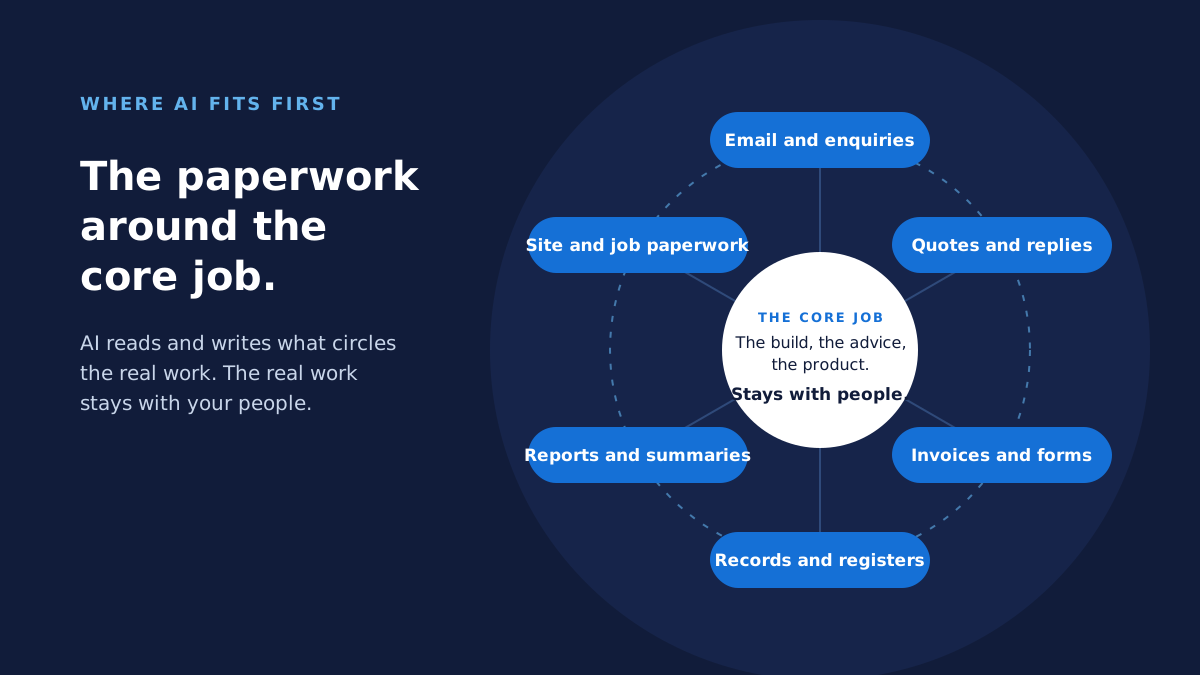
AI does its best work on the paperwork around the core job. It reads the email, forms and PDFs that arrive, writes the replies, quotes and reports that go out, and keeps the records between them current. It needs steady volume, a clear standard and a person who checks. Rare tasks, judgement calls and undocumented processes stay with people.
I opened this section a few days ago with Where does AI actually pay its way in a business of 10 to 200 people?. That piece looked at the question from the shape of a process: what comes in, what goes out, and the step in between. This one comes at it from the work itself. What kinds of tasks does AI handle well, where have I seen it earn its place, where doesn't it, and how do you spot the candidates in your own business?
It's the question I get asked most. The honest answer is narrower than the marketing and wider than the sceptics think. The Productivity Commission's December 2025 report on data and digital technology put it carefully: AI adoption is in its early stages, but people are already realising real efficiency and productivity gains. Building these systems has taught me that the gains come from a particular kind of work. Here's what it looks like.
What kind of work does AI handle well in a business this size?
AI is good at reading, sorting, summarising and drafting text at volume. In a business of 10 to 200 people, that's a large share of the admin that sits between the real work. The Australian Bureau of Statistics counts about 68,000 businesses with 20 to 199 employees and another 233,000 with 5 to 19. That's a lot of offices with an inbox, a shared drive and nobody whose whole job is the paperwork.
The categories are plain:
- Triaging what arrives. Inbound email, enquiries, forms and supplier paperwork, read and sorted by what they are and how urgent they are.
- Drafting what goes out. Replies, quotes, reports, follow-ups, the Monday summary.
- Pulling details out of documents. The figures in a PDF invoice, the dates in a contract, the fields on a scanned form.
- Keeping records current. The job register, the CRM, the compliance log, filled in from the email or document that should have updated them.
- Summarising. A forty-message thread, a long report, a transcript, reduced to what someone needs to decide.
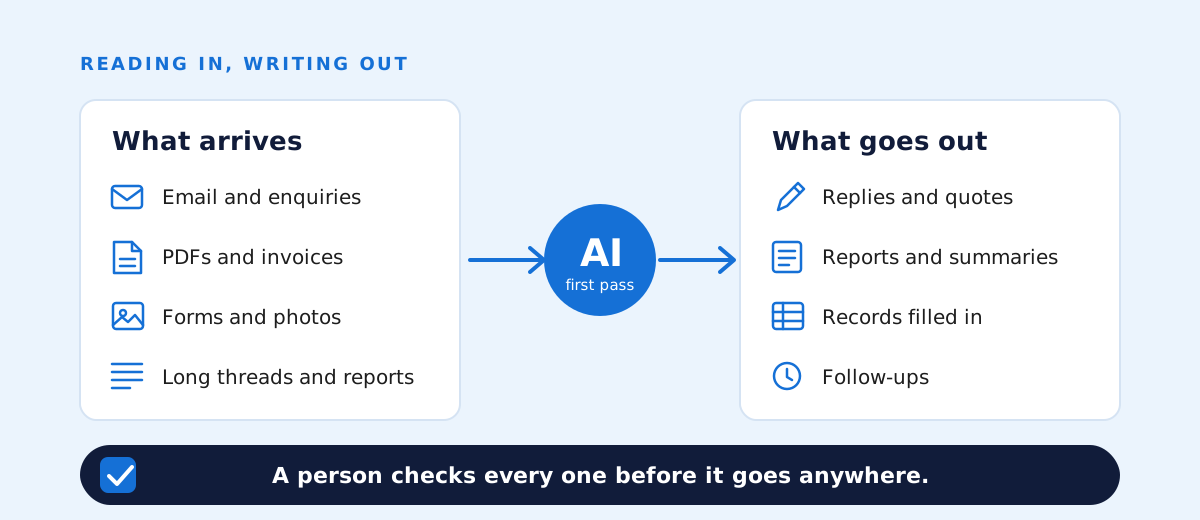
Why these? They share four things. There's a lot of it. It's mostly text. There's a recognisable right answer, so a person can see at a glance whether the draft or the sort is good. And checking takes a minute where doing it from scratch took twenty. Anthropic's documentation for Claude, the model most of my recent work runs on, describes the tool in exactly these terms: text and images in, text out, and the ability to read the text, pictures, charts and tables in a PDF you hand it. That's a reading and writing machine, and everything on that list is reading and writing.
Here's the belief under all of my work. AI earns its keep by taking repeated work off people, not by putting a chatbot on the website. A chatbot is visible and cheap, and it rarely changes anyone's day. Take the first pass of the inbox off the person who used to start every morning with it and you've changed their week. That's what I mean by process automation.
Where have I seen AI pay its way in practice?
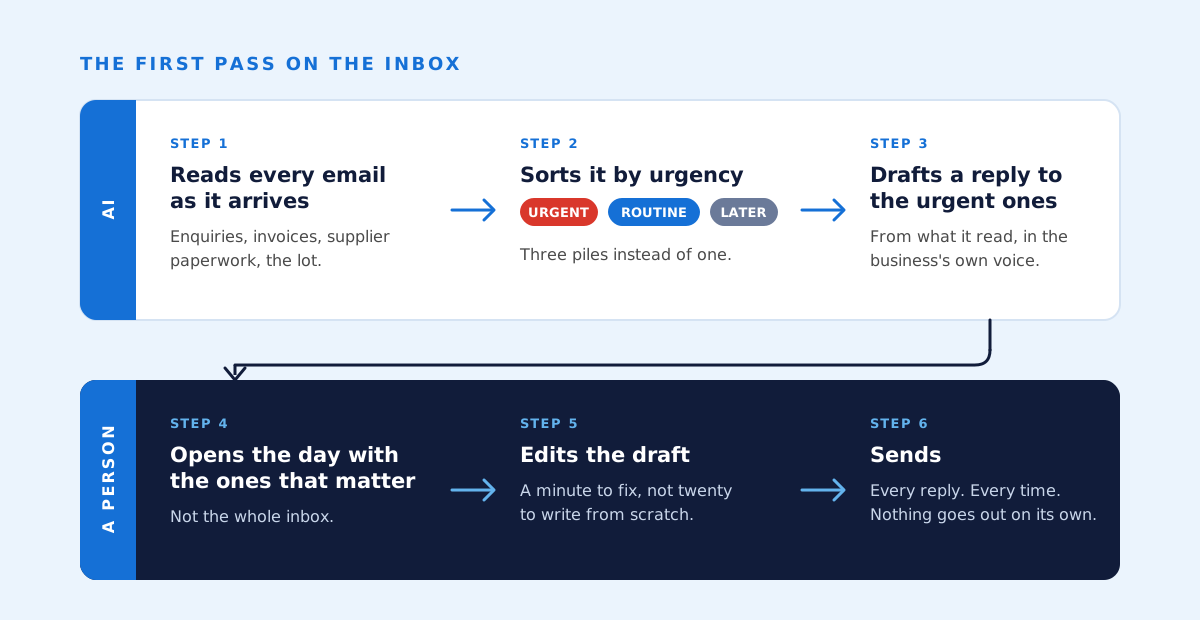
In my recent work, AI earns its place by doing the first pass on work people used to do from scratch. A person signs off every time.
The clearest example is an operations hub I built for a property development company. Their sales and marketing ran on GoHighLevel and the team worked out of a shared inbox. The hub replaced that. Now AI sorts every incoming email by urgency and drafts replies to the urgent ones, and a person edits and sends every reply. The same hub runs the CRM and the sales pipelines, books calls against Google Calendar and follows up website enquiries on its own, so people spend their attention on the call, not the reminder. It runs on Anthropic's Claude and has been in use since May 2026.
The second is a social content system for the same client. Every night it studies the client's and competitors' Instagram and Facebook accounts and flags the posts that beat the usual. AI explains why a post worked and writes scripts and captions for new ones in each account's voice. Nothing is published without a person's sign-off. Both systems are bespoke software, built because nothing off the shelf did the job.
Notice the shape. In both, AI does the first draft or the first sort, and the person keeps the decision. That isn't caution for its own sake. It's what makes the output usable, because the person fixes the ones that miss and the system gets better for it. The Australian Government's Voluntary AI Safety Standard, since carried into its Guidance for AI Adoption, makes the same point in its fifth guardrail: enable human control or intervention in an AI system to achieve meaningful human oversight. I'd put it more plainly. AI drafts and sorts. A person decides and sends.
You'll notice I haven't given you hours or dollars. I don't have figures I can stand behind for either system, so I've described what each one does and left you to judge what that would mean in your business.
Why does AI need to sit inside the systems you already run?
Because people use what's in front of them. AI that works inside the inbox, the job system or the document store gets used. A separate tool, however clever, gets opened for a week and then forgotten.
The value comes from AI reading from your existing systems and writing back to them: the email, Microsoft 365, the job or practice management software, the spreadsheet everything secretly hangs off. The draft reply appears in the inbox, not in another window. The extracted invoice figures land in the register. That's what AI implementation and integration is, and it's most of the work in any build.
I've spent 30 years building and replacing business systems, and the lesson that's held longest is this. At Origin Energy, ERM Power and Acumen Metering I looked after meter data management systems holding over 50 billion rows. Those systems mattered to the business exactly as much as people used them, and not one bit more. A system people route around doesn't exist. AI is no different.
Sometimes the existing system is the obstacle. There's no way to read from it or write to it, or it's so brittle nobody wants to touch it. That's a separate decision, and an honest one to have early: replacing a legacy system is its own project with its own roadmap, and bolting AI onto something that's already failing won't rescue it.
Where does AI not pay its way?
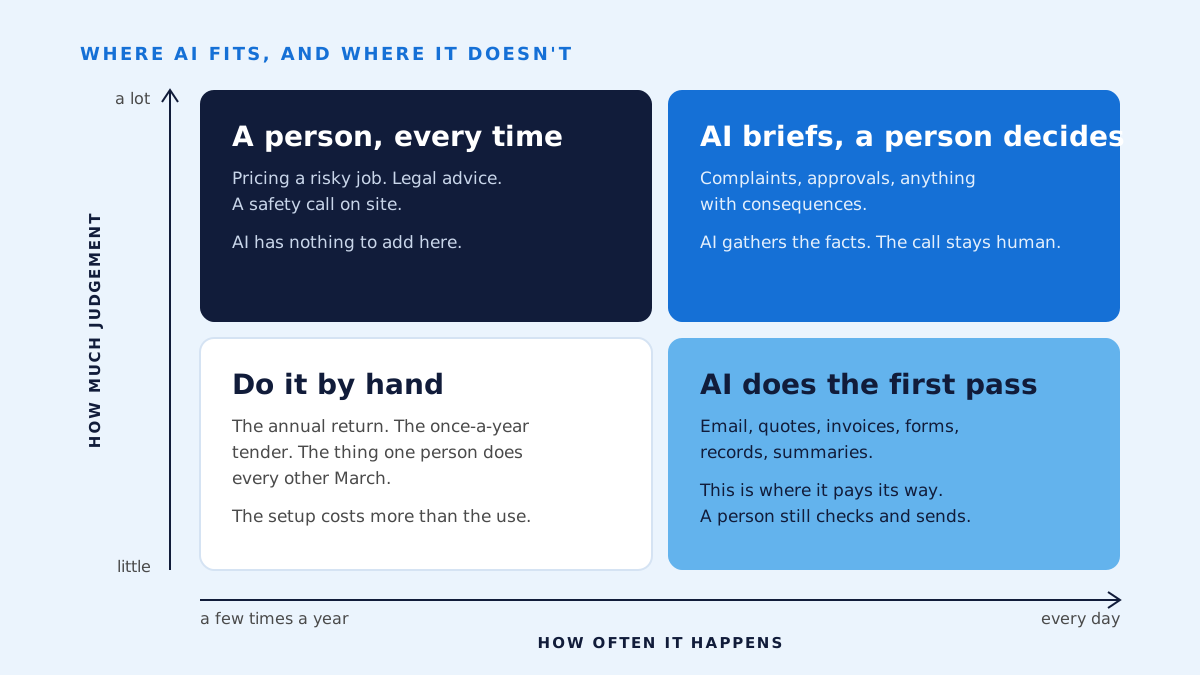
AI rarely pays its way on work that happens a few times a year, work that's mostly judgement, or processes nobody can describe clearly.
- Rare or one-off tasks. The annual return, the once-a-year tender, the thing one person does every other March. The setup costs more than the use. Do it by hand.
- Judgement with real consequences. Pricing a risky job, giving legal advice, a safety call on site, a complaint from a customer who matters. AI can prepare the briefing. It shouldn't make the call. business.gov.au puts it in one line: your business is responsible for everything your AI tools do.
- Messy or undocumented processes. If you couldn't teach it to a new starter, you can't teach it to an AI either. The work of writing the process down has to come first, and often that work turns out to be the real fix.
- Poor or scattered data. AI is only as good as what it can read. If the job history lives in three spreadsheets and someone's head, the first project is tidying that, not AI.
One more, and it's about care rather than value. Any work that touches customer or client personal information needs a clear answer to one question: where does that data go? The Office of the Australian Information Commissioner recommends that organisations don't enter personal information, and particularly sensitive information, into publicly available AI chatbots, and warns that some commercial AI products have terms that let the provider collect what you type in for further training. The systems I build use the API, where that isn't the case, but it's a question to ask of every tool. I'll write about it on its own.
How do you spot the places AI would pay its way in your business?
Look for work your people repeat every day, that's mostly reading and writing, and that someone could check in a minute. Five signs. A task that shows most of them is a candidate:
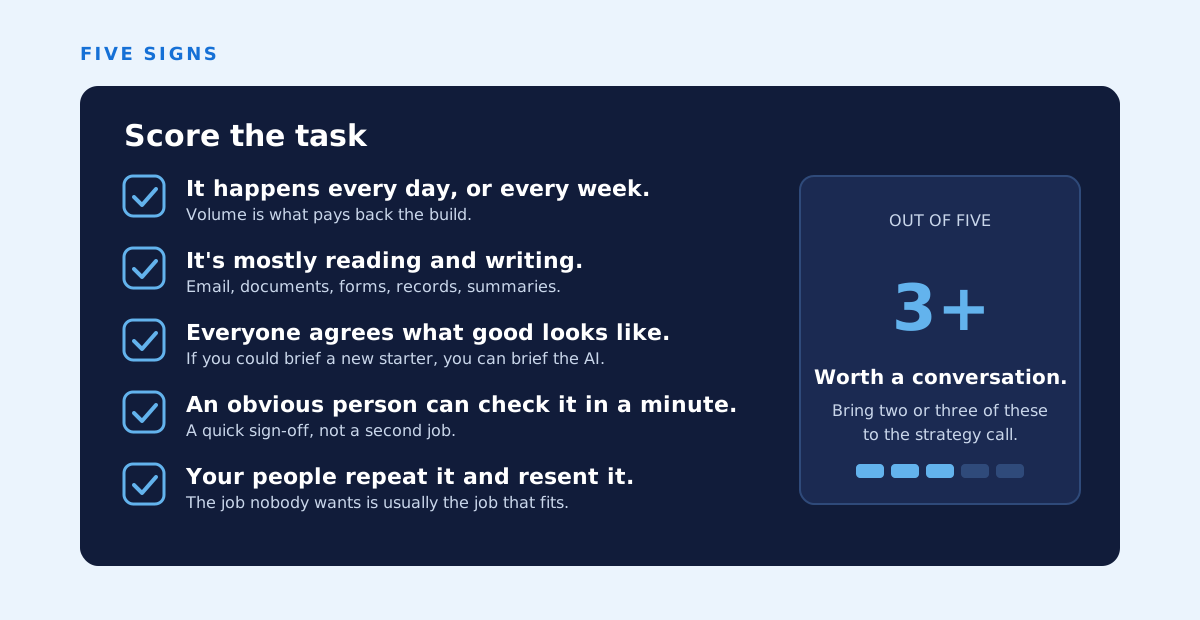
- It happens every day, or every week. Volume is what pays back the build.
- It's mostly reading and writing. Email, documents, forms, records, summaries.
- Everyone agrees what a good result looks like. There's a standard, written or not, that a person could brief a new starter on.
- Someone can check the output in a minute. An obvious person to sign off, and a quick sign-off, not a second job.
- Your people repeat it and resent it. The job nobody wants is usually the job that fits.
The simplest exercise I know is to ask your staff one question: which tasks would you hand to a capable assistant tomorrow, if you had one? Write the answers down. You'll get a longer list than you expect, and most of it will be reading and writing. Which of those to do first, and which should stay with a person, is a question for another piece. This one is about spotting the candidates.
What does this look like in construction, energy, legal and manufacturing?
The pattern is the same across industries: the document and email work around the core job is where AI usually fits first. The core job itself, the build, the advice, the product, stays with the people who know it.
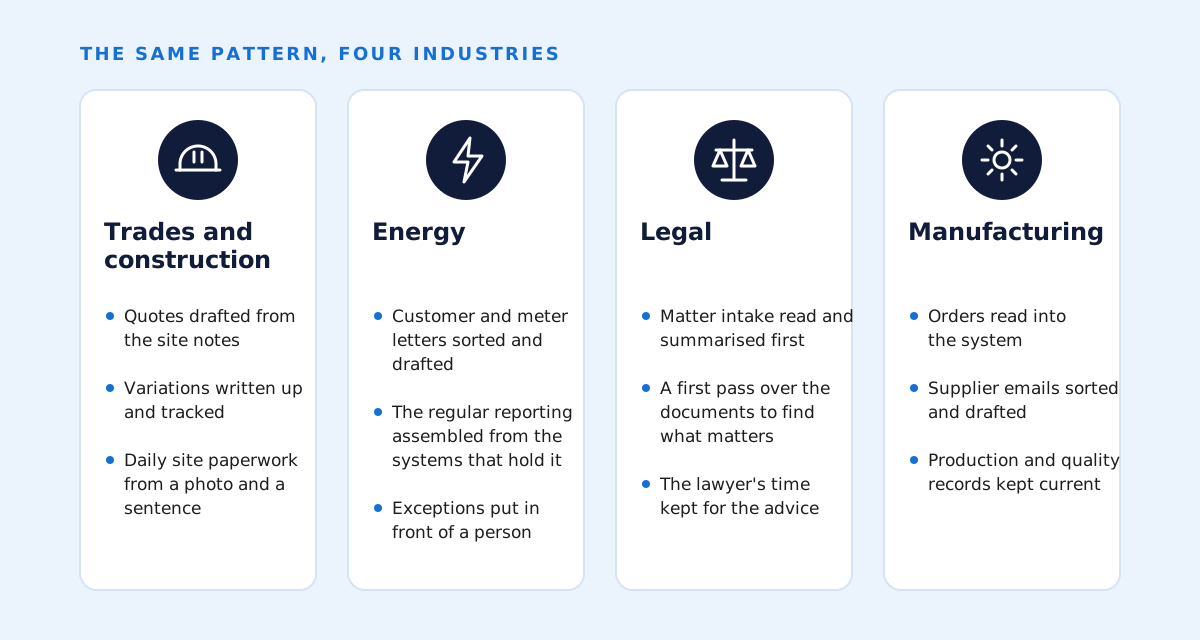
- Trades and construction. Quotes drafted from the site notes, variations written up and tracked, the daily site paperwork filled in from a photo and a sentence from the foreman.
- Energy. Customer and meter correspondence sorted and drafted, and the regular reporting assembled from the systems that hold the data. I spent years inside those systems at Origin Energy and ERM Power, and later for Acumen Metering, and the correspondence was always the part that ate the week.
- Legal. Matter intake read and summarised before a lawyer sees it, and a first-pass review of documents to find what matters. I spent eight years building software at a national law firm, and the lawyers' time was always the scarce thing.
- Manufacturing. Orders read into the system, supplier correspondence sorted and drafted, and the production and quality records kept current.
The Productivity Commission heard the same thing from the businesses that spoke to it: AI tools being used on administrative tasks such as drafting emails, responding to customer enquiries and scheduling. None of that is glamorous. All of it is where the hours go. Builders and law firms each deserve their own piece, and they'll get one.
What is the next step?
Pick two or three candidate tasks and talk them through with someone who's built these systems before. Thirty minutes is enough to say whether each one fits, roughly what it would take, and what to do first.
I lead every engagement myself and bring in trusted specialists as a job needs them. If you'd like to run your candidates past me, book a free 30-minute AI strategy call. You'll get a short written summary afterwards, whether or not we ever work together.
Common questions
- Is AI worth it for a business with 10 or 20 staff?
- Often, yes, as long as there's a repeating stream of reading and writing work to point it at. A 15-person business with a busy inbox and a weekly quoting cycle has plenty. What decides it is volume, not headcount.
- Do we need to replace our software before we can use AI?
- Usually not. Most of the value comes from AI reading from and writing back to the email, files and systems you already run. If a system has no way in or out, or is already failing, replacing it is a separate decision, and I'll say so early.
- Will AI replace people in our office?
- In the systems I build, no. It takes the first pass of repetitive reading and writing off people, and a person still decides and sends. The work that needs judgement, relationships and accountability stays with them, and they get more of their week for it.
- What if our processes aren't written down anywhere?
- Then that's the first job, and it's worth doing regardless. If you couldn't teach a task to a new starter from what exists today, AI can't be taught it either. Writing it down often shows a simpler fix that needs no AI at all.
- Does someone still need to check what the AI produces?
- Yes, and the system should be designed so that check takes a minute, not a second job. AI drafts and sorts. A person decides and sends. That's the point the Voluntary AI Safety Standard makes about human oversight, and it's what makes the output usable.
Sources
- Australian Bureau of Statistics, Counts of Australian Businesses, including Entries and Exits, July 2022 to June 2026
- Productivity Commission, Harnessing data and digital technology, inquiry report, December 2025
- Department of Industry, Science and Resources, Voluntary AI Safety Standard: the 10 guardrails
- Office of the Australian Information Commissioner, Guidance on privacy and the use of commercially available AI products
- business.gov.au, Artificial intelligence (AI)
- Anthropic, Models overview
- Anthropic, PDF support