Start with one job, not the technology. I find where that work already happens, whether it's an inbox, a job system or a shared drive, and connect AI to it through the access the system already offers: an API, a connector or an export. The AI drafts or sorts. A person checks and sends. Then I widen it.
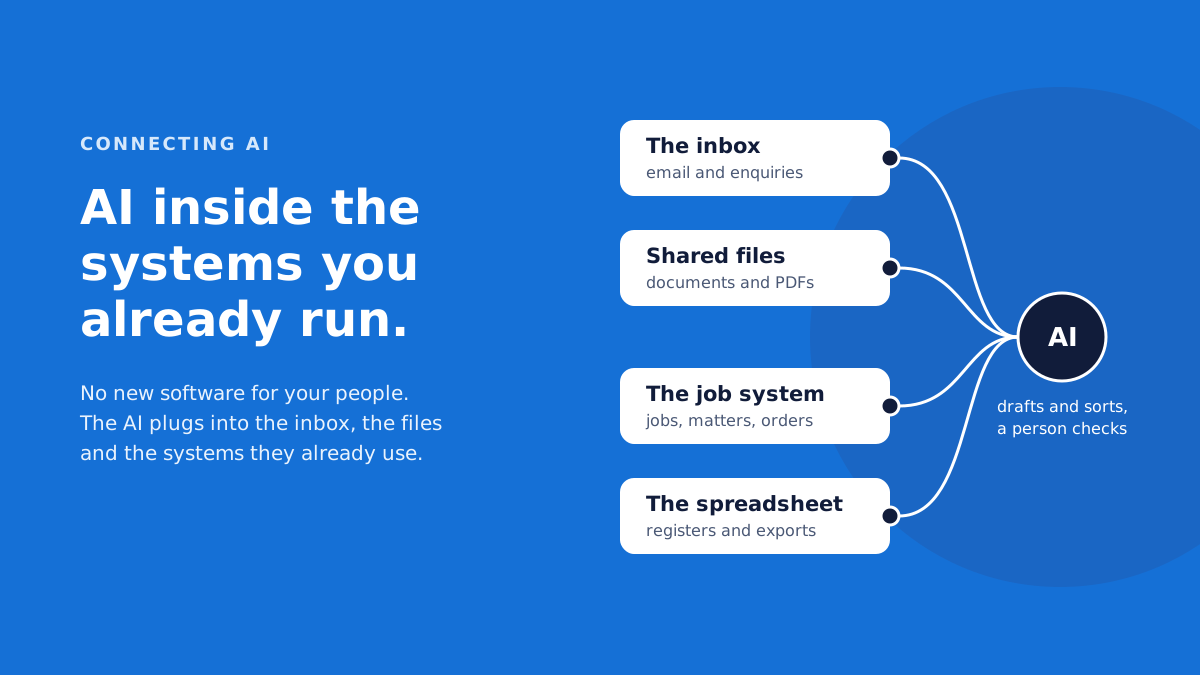
Most owners I talk to assume using AI means buying new software. Another platform, another login, another place for people to check. It rarely does. The work is already happening somewhere: in an inbox, on a shared drive, in a job system someone set up years ago. The useful question is how to get AI into those places safely, without breaking what already works. Here's how I go about it.
What does connecting AI to a business system actually mean?
It means giving an AI model controlled access to the place where a piece of work already happens, so it can read what it needs and hand back a draft, a sort or a summary inside that same system. Nobody has to move to a new tool to use it.
Compare that with a chat tool. Someone copies an email into a browser window, asks for a reply and pastes the answer back. It helps, but the person is doing the plumbing, and nothing stops them pasting in something that shouldn't leave the building. Connected AI works where the email already is. The draft appears in the inbox. The summary lands on the job.
Every connection has three parts: the system that holds the work, the AI model, and a small piece of software in between that passes information each way and applies the rules. Those rules cover what the AI can read, what it can write back, and the record of what it did. That middle piece is most of what I build when I do AI implementation and integration.
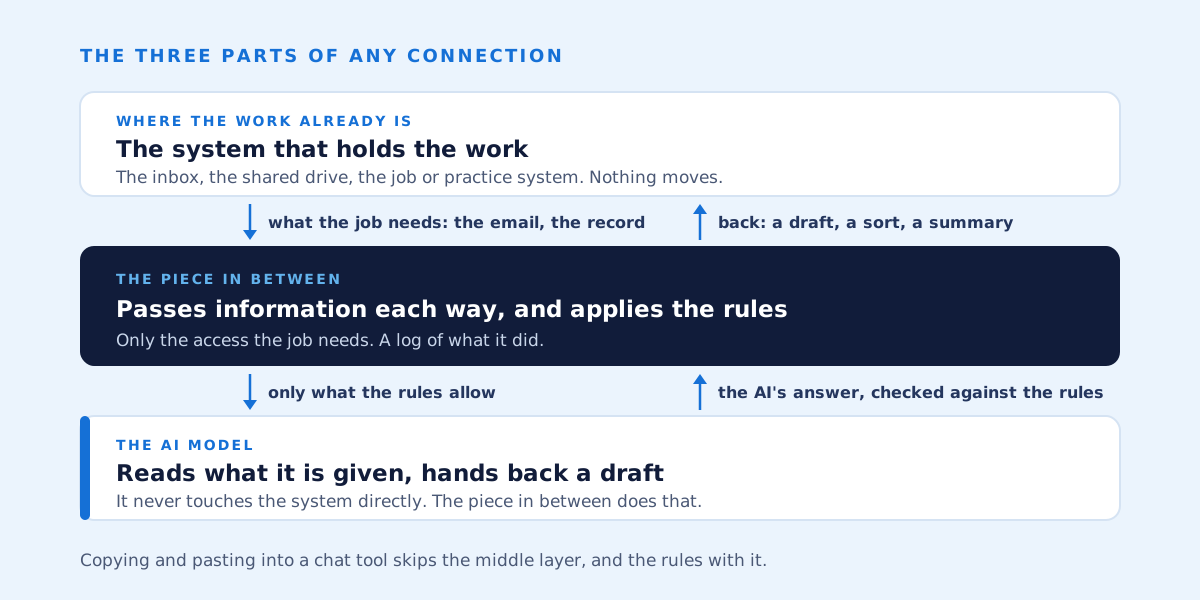
That's how the models are designed to be used, too. Anthropic's documentation for Claude describes tool use like this: you give Claude a set of tools, it decides when one is needed and sends back a structured request, and your own software carries it out and returns the result. Your software touches your systems, under your rules. The model never does. There's now an open standard for these connections too: the Model Context Protocol. Anthropic created it and handed it to the Linux Foundation's Agentic AI Foundation in December 2025.
Why go to the trouble? I've spent 30 years building and replacing business systems, and the systems a business already runs hold what it knows: the customer history, the job notes, the way things actually get done. AI should work inside them, not beside them.
Where in your existing systems does AI usually plug in?
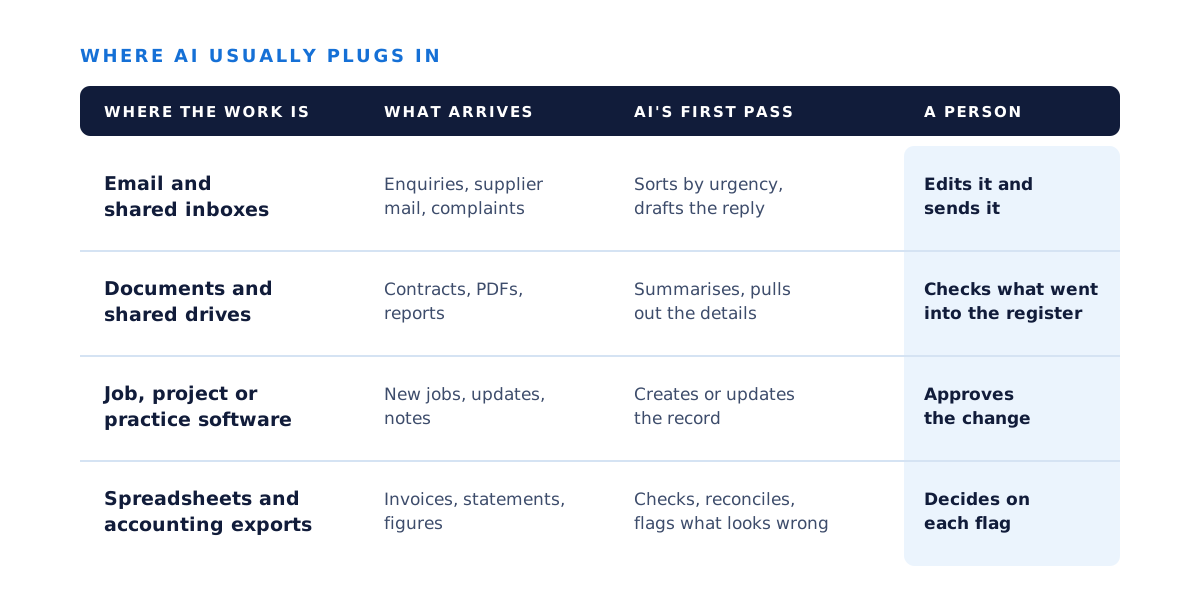
Usually where text piles up and someone has to read it and decide what to do: email, shared documents, job or matter management systems, forms and spreadsheets.
- Email and shared inboxes. Sorting what arrives by urgency, and drafting replies for a person to send.
- Documents and shared drives. Reading and summarising, and pulling the details out into a register or a system.
- Job, project or practice management software. Creating or updating records from the information coming in.
- Spreadsheets and accounting exports. Checking and reconciling, and flagging what looks wrong for a person to decide.
It's the same shape in every industry I work with, from construction and trades to energy, legal and manufacturing. The core work stays with people, and the reading and writing around it is where AI fits. I've written about which tasks suit AI in the work AI handles well, so I won't repeat it here. This piece is about the plumbing.
How does AI get access to a system, and what if there's no API?
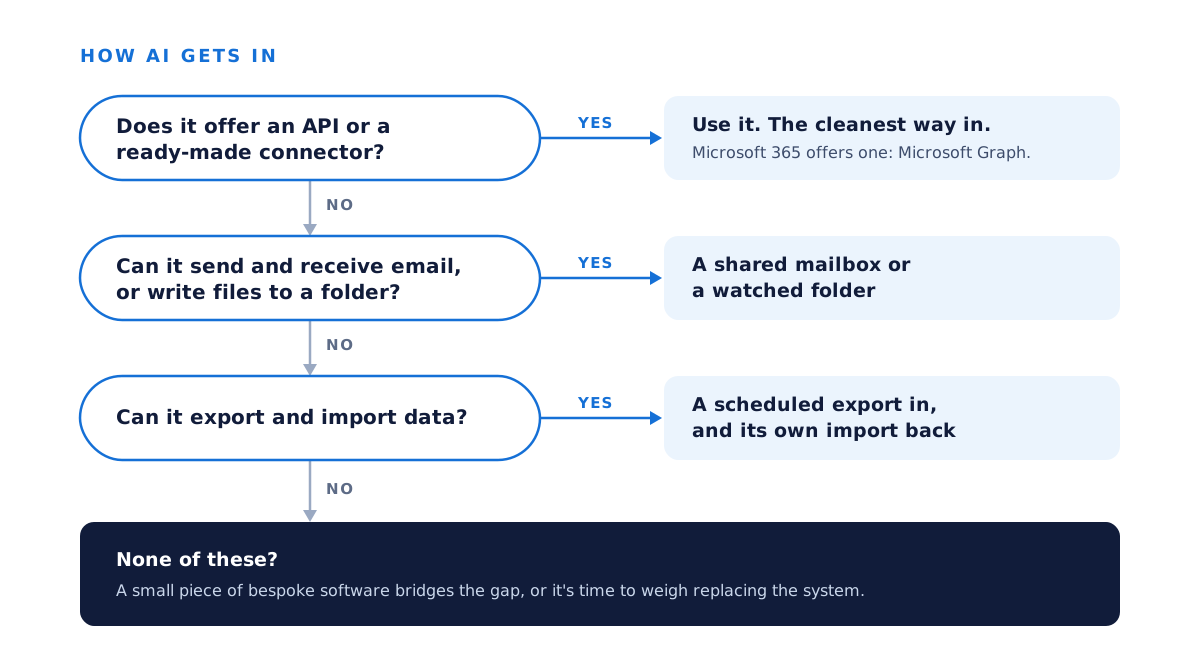
Most modern business software offers an API or a ready-made connector, and that's the cleanest way in. Where there isn't one, there are still workable routes: a shared mailbox, a watched folder, a scheduled export or the system's own import.
An API is a documented door the software vendor provides, so other programs can read and write data without a person clicking through screens. If your software has one, that's how the connection gets in.
Microsoft 365 is the example most people recognise. Microsoft Graph is a single doorway that other software uses to reach a business's Microsoft 365 data: Outlook mail and calendars, OneDrive and SharePoint files, Teams and more. Microsoft says the Graph APIs are available under standard Microsoft 365 licence terms. Only its Copilot APIs need a Copilot licence. It also offers Copilot connectors, which bring data from other systems into Microsoft 365 so Copilot and search can use it. They're handy if you already pay for Copilot, but you don't need them to connect AI to your mail and files.
Older software often has no API, and that's less of a dead end than it sounds. If it can send and receive email, a shared mailbox is a way in: the AI reads what lands there and drafts what goes out. If it writes files to a folder, the connection watches the folder. If it can export and import, a scheduled export brings the data out and the system's own import takes the result back. Where none of those fit, a small piece of bespoke software can bridge the gap.
Whichever route it takes, the connection gets only the access the job needs. It runs under its own account, never a staff member's login. Microsoft's advice for Graph is to apply the principle of least privilege, and its tools can hold an app to that. An app can act for a signed-in person and see only what they can, or act as itself with nobody signed in, which needs an administrator's consent. In Exchange Online an administrator can limit an app's mail access to named mailboxes, using a feature Microsoft calls RBAC for Applications. One catch: that limit only holds if the app hasn't also been given organisation-wide mail access.
Where does a person stay in the loop?
At the point where something leaves the business or changes a record that matters. The AI prepares the work, and a person reads it, corrects it if needed, and sends or approves it.
Here's how that looks in a system I built. The operations hub for a property development company replaced a marketing platform and a shared inbox. AI sorts every incoming email by urgency and drafts replies to the urgent ones, and a person edits and sends every reply. The social content system I built for the same client works the same way. AI drafts scripts and captions in each account's voice, and nothing is published without a person's sign-off.
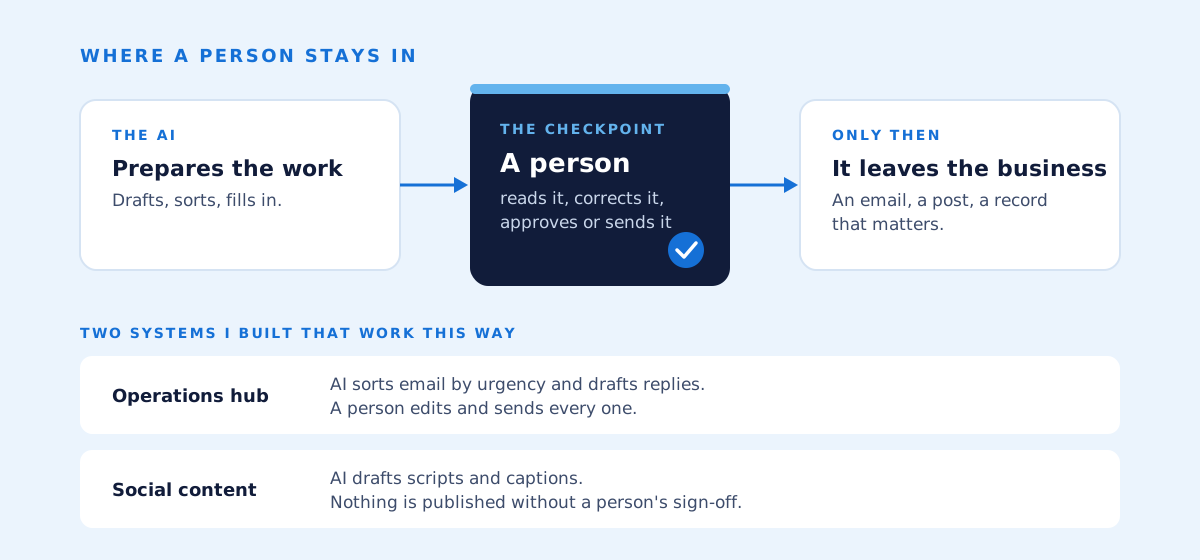
That isn't caution for its own sake. Accountability stays with the business, which is where it belongs. Mistakes get caught before a customer sees them. And staff see the AI as help with their work rather than something being done to them. It's the pattern behind all the process automation I do: the automation does the repetitive part, and a person keeps the decision.
The Australian Government's Guidance for AI Adoption makes the same call in two of its six practices: decide who is accountable, and maintain human control. It came out in October 2025 to update and simplify the government's earlier Voluntary AI Safety Standard. The guidance says your organisation is ultimately accountable for how and where AI is used, and that a person should oversee each AI system in a way that matches how much autonomy it has and how high the stakes are.
There's a legal side too. In its December 2025 snapshot on AI, the ACCC says businesses using chatbots need to make sure the answers they give customers don't run against their obligations under the Australian Consumer Law, and that the risks are higher without adequate human oversight. A message drafted by AI is still your message.
What should you check before you connect anything?
Three things: what data the AI can see, where that data's sent and kept, and how you'll keep the records the business has to keep. Settle those before the first connection goes live.
What the AI can see. Give the connection its own account and a written list of what it can and can't reach: one mailbox rather than every mailbox, read-only wherever reading is enough. The Australian Cyber Security Centre puts it in one line in its advice on AI agents: limit their privileges to the minimum required for the task.
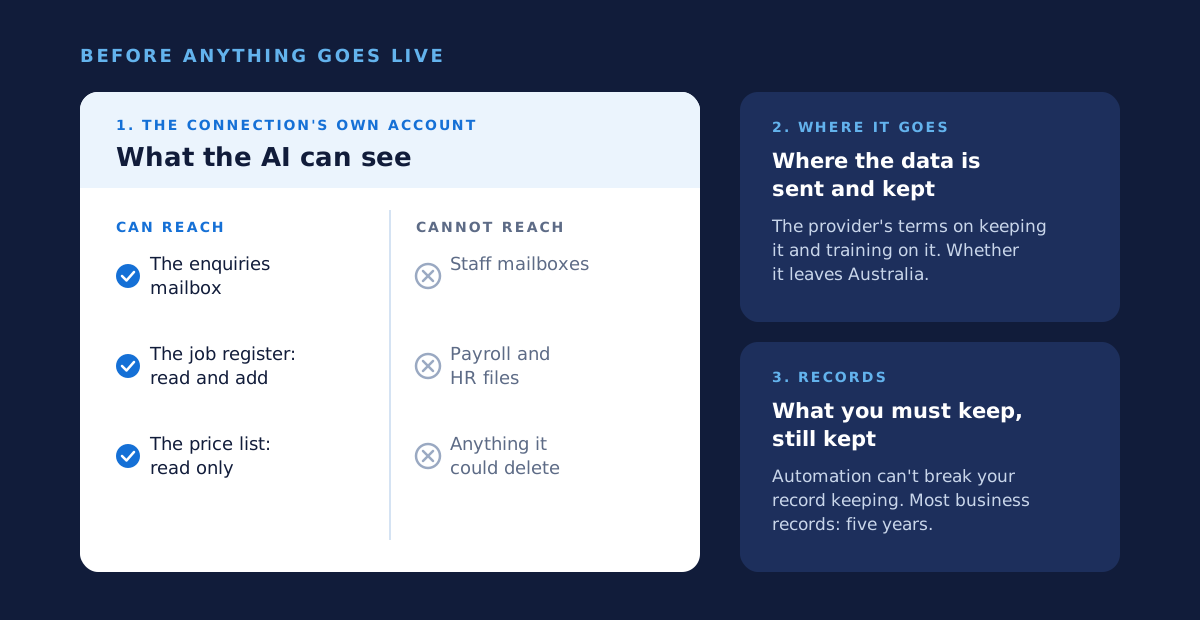
Where the data goes. Read the AI provider's terms on how long it keeps what you send, and whether it trains on it. Take Anthropic, the maker of Claude, which most of my recent work runs on. It doesn't train on what's sent through its API unless you give permission, and it deletes API inputs and outputs within 30 days by default. Its data is stored in the United States, though, and today you can't pin its processing to Australia. If customers' personal information is involved, that's a disclosure overseas. Under Australian Privacy Principle 8 you have to take reasonable steps to make sure the overseas provider handles it to Australian standards, and if the provider breaches the principles, the law can treat it as your breach. Most businesses with a turnover of $3 million or less are exempt from the Privacy Act, though not all of them: health service providers are one exception. The Office of the Australian Information Commissioner's guidance on commercially available AI products is worth reading before you choose any tool.
Records. Automation mustn't break the records the business has to keep. The ATO's general rule is five years, counted from when a record was made or the transaction finished, whichever is later. Digital records are fine as long as they meet its rules.
A plain word on risk. Connecting AI to a system gives it access to that system's data. Your business stays responsible for that data, and for anything sent in its name. This piece is general information, not legal or security advice. Where data goes when you use AI deserves a piece of its own, and it'll get one.
When is connecting AI to an old system not enough?
When the system itself is the obstacle: no way in, data that can't be trusted, or a workflow that only exists because of the old software's limits. Then it's worth weighing replacement against building on top.
- There's no way in. No API, no export, no email. Every route in the flowchart above comes back no.
- Nobody trusts the data. Three versions of the customer list, and a person who knows which one is right. AI will read all three with equal confidence.
- The workflow is built around the software's limits. Double entry, a spreadsheet on the side, a step that exists only because the system can't do better. Automating that just makes the workaround faster.
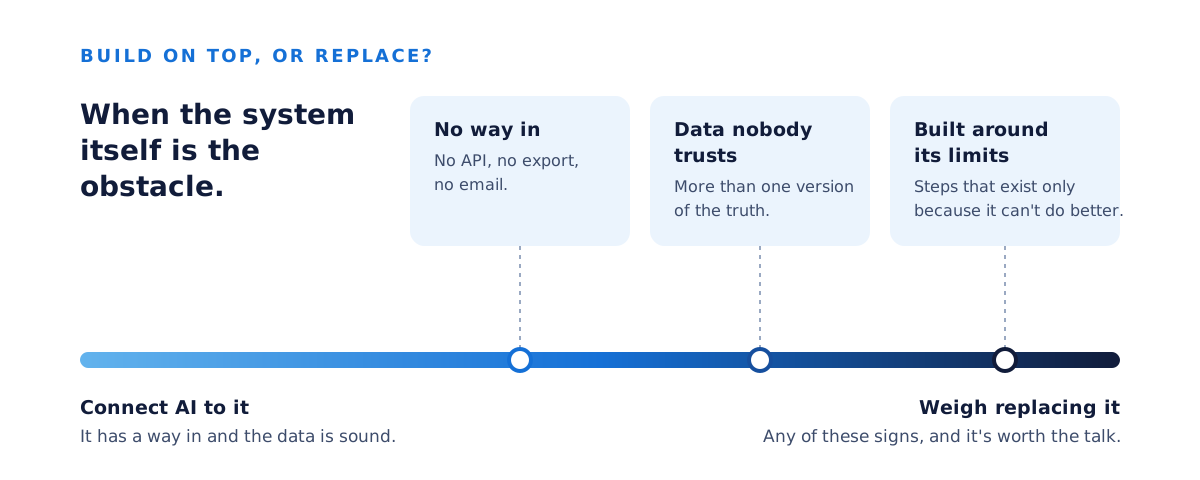
I've spent a good part of my career at the far end of that scale. I've done data migration work at Origin Energy and ERM Power, and looked after meter data management systems holding over 50 billion rows at Origin Energy, ERM Power and Acumen Metering. It taught me that moving off an old system is a project in its own right, and nobody should drift into one by accident. If your system shows these signs, replacing a legacy system is the conversation to have. Whether to replace or build on top is a big enough question for its own piece.
How do you start?
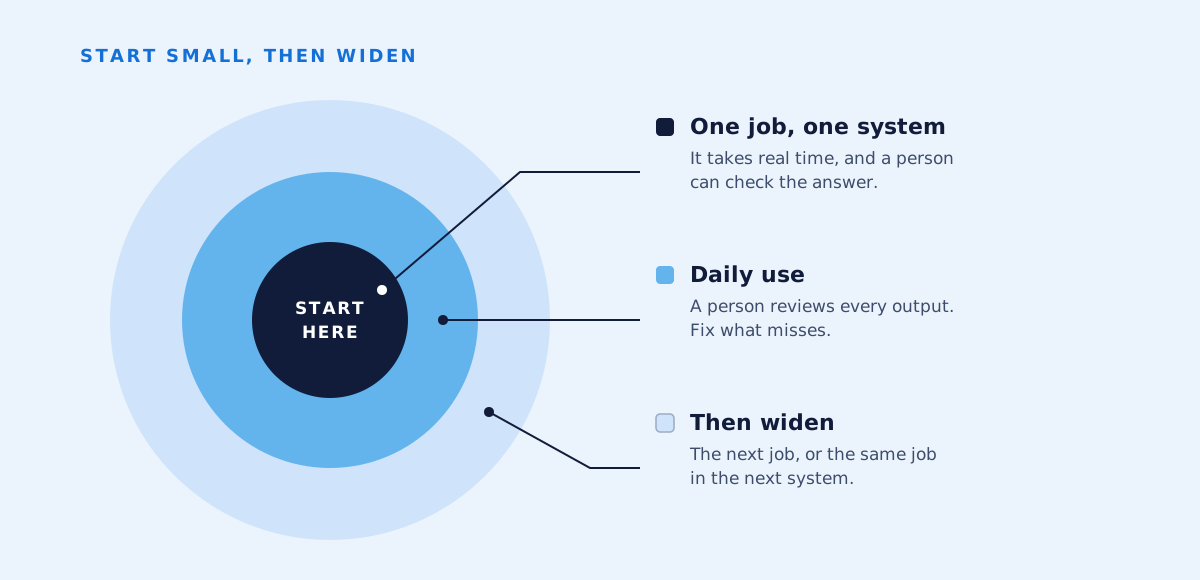
Pick one job that takes real time, lives in one system and has a clear right answer a person can check. Connect AI to that, run it in daily use, and only then extend it.
We choose the job together, ideally one where a wrong draft is cheap to fix. I map where it happens: which inbox, which system, who touches it. I confirm the way in, whether that's an API, a connector, a shared mailbox or an export. I build it with a person reviewing every output. Then, once it's earned its place in daily use, we widen it. If you're not sure which job to start with, where AI pays its way will help you choose.
I lead every engagement myself and bring in trusted specialists as a job needs them. If you'd like to talk through which of your systems to start with, book a free 30-minute AI strategy call. You'll get a short written summary afterwards, whether or not we ever work together.
Common questions
- Will connecting AI change how our existing software works?
- No. The connection reads from and writes to the system through the access it already offers. Your people keep using the same screens, and the AI's drafts and sorts just turn up there.
- Does the AI need access to everything in our systems?
- No, and it shouldn't have it. Give the connection its own account with only the access the job needs: one mailbox, not every mailbox, and read-only wherever reading is enough.
- Can AI work with old software that has no API?
- Often, yes. A shared mailbox, a watched folder, or a scheduled export and import can all work, and a small piece of bespoke software can bridge what's left. If none of those fit, the software itself may be the problem.
- Do we need Microsoft Copilot to use AI with Microsoft 365?
- No. Microsoft says its Graph APIs are available under standard Microsoft 365 licence terms, and only its Copilot APIs need a Copilot licence. Copilot is one option, not a prerequisite.
- Who is responsible if the AI drafts something wrong?
- Your business is, which is why a person reviews the work before anything leaves. The ACCC says the consumer law applies to what a chatbot tells customers just as it does to anything else a business says, and the government's AI guidance says your organisation is ultimately accountable for how it uses AI.
Sources
- Microsoft Learn, Microsoft Graph overview
- Microsoft Learn, Overview of Microsoft Graph permissions
- Microsoft Learn, Role Based Access Control for Applications in Exchange Online
- Microsoft Learn, Microsoft 365 Copilot connectors overview
- Microsoft Learn, Microsoft 365 Copilot APIs overview
- Anthropic, Tool use with Claude
- Anthropic, Donating the Model Context Protocol and establishing the Agentic AI Foundation, 9 December 2025
- Anthropic Privacy Center, Is my data used for model training?
- Anthropic Privacy Center, How long do you store my organization's data?
- Anthropic, Data residency
- National AI Centre, Guidance for AI adoption: foundations
- Department of Industry, Science and Resources, Voluntary AI Safety Standard
- Australian Cyber Security Centre, Careful adoption of agentic AI services, May 2026
- Australian Cyber Security Centre, Artificial intelligence for small business
- Privacy Act 1988, Schedule 1, Australian Privacy Principle 8, and sections 6D and 16C
- Office of the Australian Information Commissioner, Guidance on privacy and the use of commercially available AI products
- Australian Taxation Office, Overview of record-keeping rules for business
- Australian Taxation Office, Digital record keeping for businesses
- ACCC, Recent developments in artificial intelligence: industry snapshot, December 2025